The illustrated guide
Every screen in the app and every overlay in the game, with a screenshot of each — what it shows, why it's there, and the moment in a round when it earns its place.
What NoxuTFT is
NoxuTFT is two things running side by side. A desktop app you read between games — comps, statistics, your own match history — and a set of in-game overlays that draw on top of Teamfight Tactics while you play, so the information arrives at the moment the decision does.
It never reads game memory and never injects into League. Everything it shows comes from what the game itself returns, plus a comp and statistics database refreshed every patch.
The desktop app
Comp browser — the home screen
The first screen is a ranked list of compositions for the current patch. Each row carries the tier (S down to D), the comp's name, how fast it wants to level (Fast 8, Default) and a difficulty tag, then the traits it hits, the units with their items, and the numbers that matter: average placement, top-4 rate, win rate and how many games back it up.
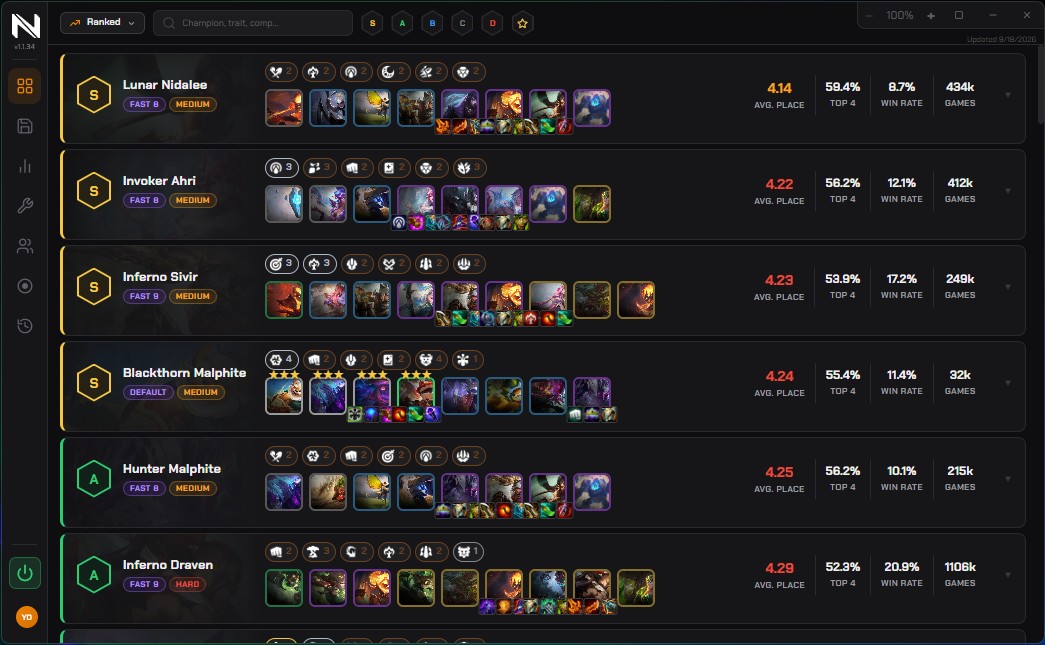
Filter by queue at the top left — Ranked, Double Up, Hyper Roll — search by champion, trait or comp name, or narrow to a tier with the S / A / B / C / D buttons. The star keeps your own shortlist. The date on the right tells you when the data was last refreshed, so you always know how current it is.
Statistics panel
Deeper than the comp list, and organised the way you actually ask questions. Switch between Champions, Items, Traits, Augments and Wisps, then filter by queue, by rank bracket and by unit cost.
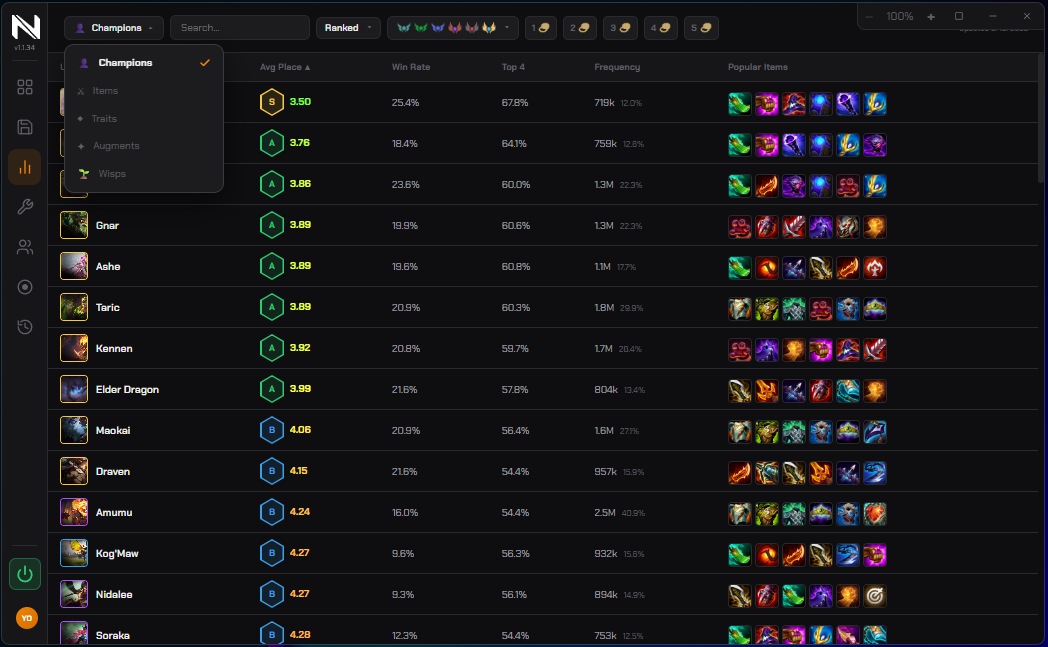
Each row gives average placement, win rate, top-4 rate, how often the unit is picked, and the items people actually build on it. That last column answers the question the item cheat sheets can't: not what's theoretically best, but what is winning right now.
Comp builder
Build a composition and save it for the game. Pick a level from 4 to 9, drop champions onto the board, add items and augments, and the hexes light up with something most builders don't have: how often a unit is placed on that exact hex and the win rate when it is.
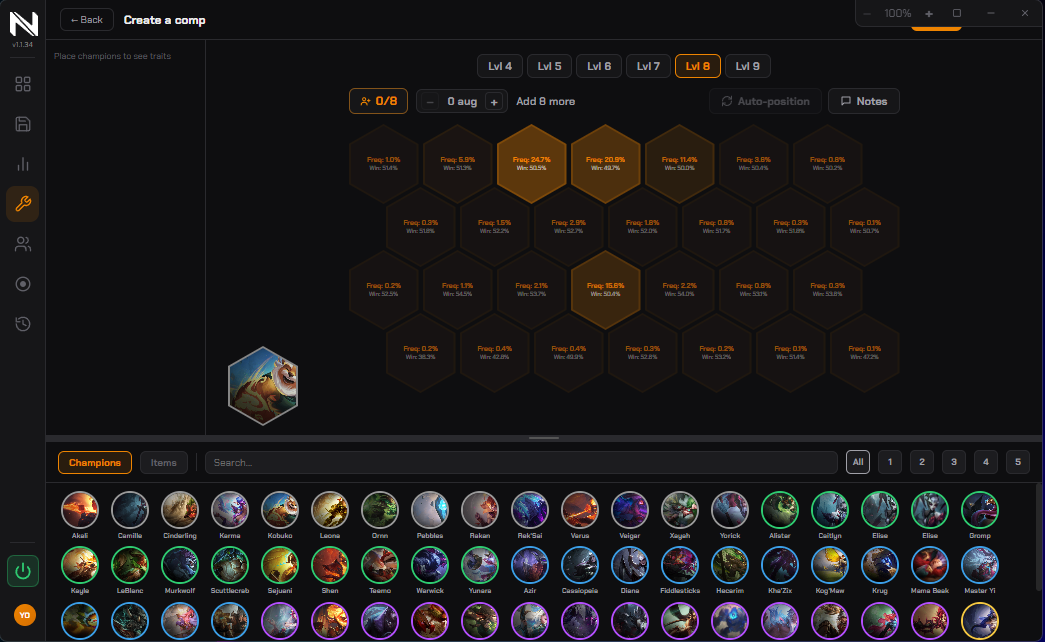
Auto-position arranges the board for you if you'd rather not argue with it, and Notes lets you write down the plan — what to look for, when to pivot. Saved comps show up in the overlay in your next game.
Match history
Your rank, LP, peak, and the last games with placement, stage, length and the board you finished with. The summary line is the useful part: average placement, top-4 rate, win rate and your current streak over the last ten games.
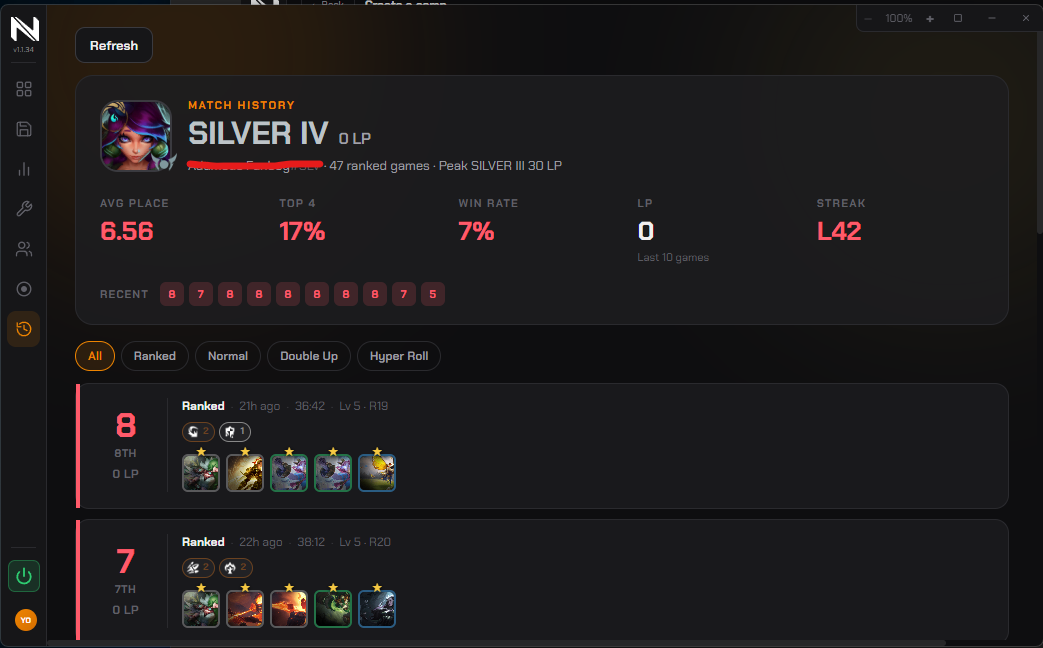
Filter by queue — Ranked, Normal, Double Up, Hyper Roll — and you can look up other players, not only yourself.
Account manager
Add your League accounts once and switch between them without typing a password each time. Useful if you smurf, play on more than one region, or share a machine.
The in-game overlays
These appear once League is running. NoxuTFT finds the window on its own and places itself on top — nothing to configure, no screen region to drag.
Pool tracker
The one number the game refuses to give you. Each champion in the shop gets a badge showing how many copies are still in the shared pool, so you know whether rolling for that three-star is a plan or a prayer.

The strip above the shop carries your level roll odds for the current level — the percentage chance of each cost appearing — so the decision to roll now or level first stops being a guess. Units you're targeting are highlighted.
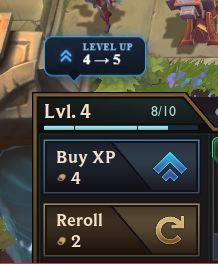
Level-up tooltip
A small marker over the XP button that tells you when levelling is the better use of your gold than rolling, given your level, your gold and where you are in the stage.
Augment overlay
The augment screen gives you three names and a timer. NoxuTFT puts a grade on each one — and, more importantly, grades them against the comp you're actually playing, not against a global average.
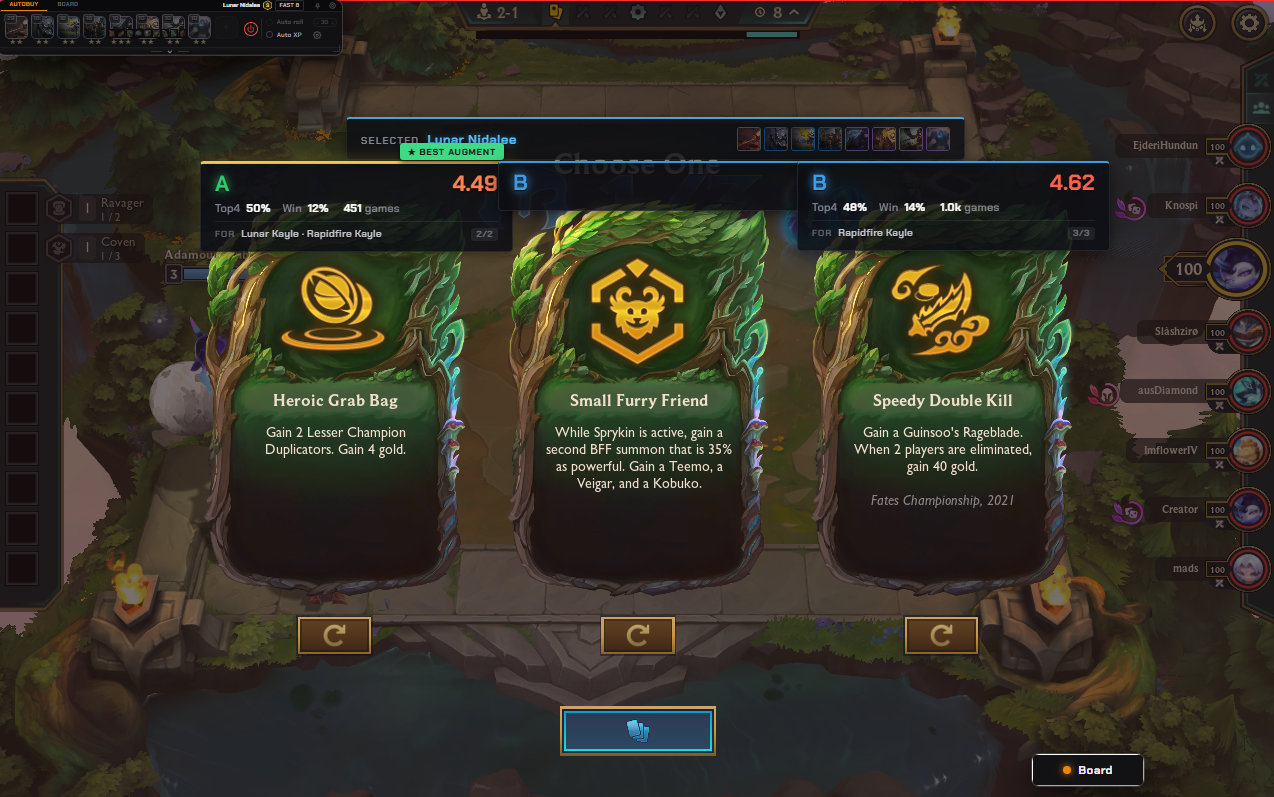
Each card shows the letter grade, average placement, top-4 and win rate, and the sample size behind it. The FOR line names which comps the augment suits and how well it fits the one you've selected. The best of the three is marked, so you can decide in a glance and spend the rest of the timer thinking about your board.
Board AI — what to add, keep and bench
A live panel that reads your board and tells you where it's heading. The top line names the composition you're closest to and how strong the match is.
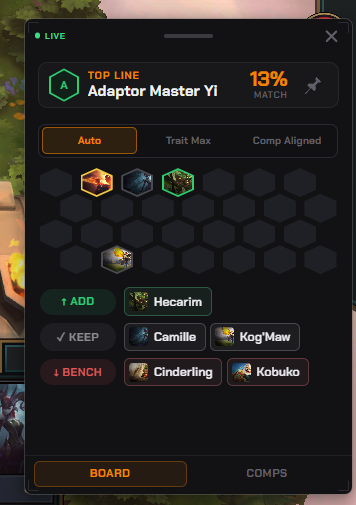
Three modes, because there isn't one right answer:
- Auto — the best board it can see from what you're holding.
- Trait Max — squeeze the most trait breakpoints out of your units.
- Comp Aligned — stay on the composition you picked, even if a detour would be stronger this round.
Below that, the practical answer: ADD, KEEP, BENCH — named units, not vague advice. The COMPS tab shows which compositions you could still pivot into from here.
Board positioning overlay
Positioning decides fights you'd otherwise win. This overlay draws it directly on the board: a green check on units already in the right place, a marker on the ones that shouldn't be there, and arrows showing exactly where to drag them.
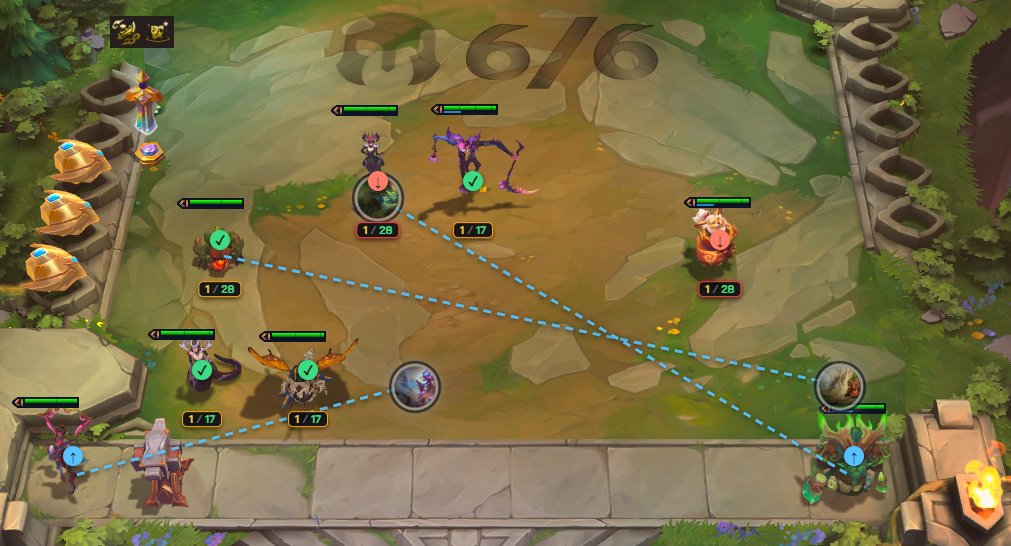
The counter under each unit — 1 / 28 — is how many copies you hold and how many remain in the pool, so the positioning advice and the rolling decision live on the same screen.
Auto-buy bar
A strip at the top of the screen holding your target champions. Each one carries a star level: set a unit to two stars and NoxuTFT stops buying it the moment you get there, greying it out so gold stops leaking into a unit you've already finished.

Search by champion or by trait to fill the bar. Auto roll keeps rerolling down to a gold floor you set, and Auto XP buys levels for you. Both sit next to the toggle that turns the whole thing off.
Before you turn automation on. Auto-buy, auto-roll, auto-XP and auto-position simulate clicks on top of the game window. Riot's terms don't list this as forbidden, and they don't explicitly permit it either. Our ban rate today is zero, but that rests on a policy Riot can change, and we won't pretend to a certainty we don't have. Everything else in this guide — pool tracker, augment grades, board AI, positioning, statistics — is pure display and works with automation switched off.
A game with NoxuTFT open
How the tools hand off to each other over a match:
- Before queue. Comp browser to see what's strong this patch, comp builder if you want to bring your own plan.
- Early stages. Board AI tells you which comps your opening units point toward. The pool tracker shows what's contested before you commit.
- Augment rounds. Grades scored against your comp, not against the ladder average.
- Mid game. Level-up tooltip on the roll-or-level call; auto-buy catches your units while you read the board.
- Before each fight. Positioning overlay for the arrangement, ADD / KEEP / BENCH for the board itself.
- After. Match history for what the run actually looked like.
What NoxuTFT doesn't do
- No memory reading and no injection into the League process.
- No Overwolf, no browser extension, no driver. The overlay ships in the installer.
- No ads in the overlay and no background telemetry.
- No macOS or Linux build. Windows 10 and 11, 64-bit only.
Twenty languages
The app speaks every language Teamfight Tactics itself ships: English, Français, Deutsch, Español, Italiano, Português, Русский, Polski, Türkçe, 日本語, 한국어, 中文, Tiếng Việt, ไทย, Bahasa Indonesia, Čeština, Magyar, Română, Ελληνικά and العربية.